MADALGODocs
Back to site
🌐Get Started
  • What Is MADALGO?
  • What Is TradingView?
  • Setup MADALGO On TradingView
  • Join MADALGO In Discord
📊MADALGO Premium Solutions
  • MADALGO Pulse
  • MADALGO Navigator
  • MADALGO Dynamics
  • Updating MADALGO
  • Setting Alerts
  • Changelogs
📈Technical Analysis
  • Charts
  • Volume
  • Support & Resistance
  • Trends
  • Technical Indicators
📚Trading — Best Practices
  • Trader Profile
  • Diversification
  • Money Management
  • Emotional Discipline
  • Do's & Don'ts
  • Recommended Brokers
❓FAQ
  • Frequently Asked Questions
🔗Useful Links
  • Discord
  • YouTube
  • X
  • FB
  • Free Indicators
  • Help Center - TradingView
🌐Get Started
  • What Is MADALGO?
  • What Is TradingView?
  • Setup MADALGO On TradingView
  • Join MADALGO In Discord
📊MADALGO Premium Solutions
  • MADALGO Pulse
  • MADALGO Navigator
  • MADALGO Dynamics
  • Updating MADALGO
  • Setting Alerts
  • Changelogs
📈Technical Analysis
  • Charts
  • Volume
  • Support & Resistance
  • Trends
  • Technical Indicators
📚Trading — Best Practices
  • Trader Profile
  • Diversification
  • Money Management
  • Emotional Discipline
  • Do's & Don'ts
  • Recommended Brokers
❓FAQ
  • Frequently Asked Questions
🔗Useful Links
  • Discord
  • YouTube
  • X
  • FB
  • Free Indicators
  • Help Center - TradingView
Docs
  • FAQ
  • Intro
  • Guides
  • Technical Analysis
Community
  • Discord
  • X
  • YouTube
More
  • Programs
  • Blog
Copyright © 2026 MADALGO. Licensed under CC BY-NC-ND 4.0

How To Update

Apply A Update

To apply an update, you need to:

  1. Refresh your browser or mobile app
  2. Remove the indicator from your chart
  3. Re-add it from your invite-only indicators

The latest version should appear.

Tip

Make sure to save your chart layout on Tradingview after successfully installing an update so you can ensure it will stay
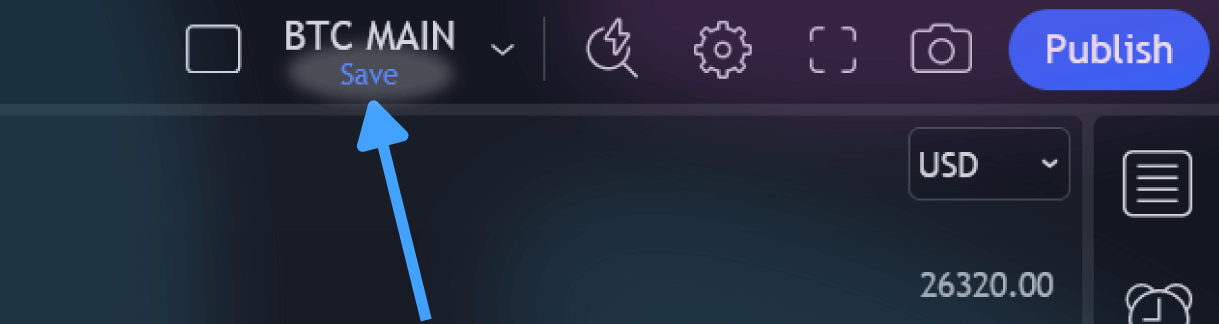
Save Chart

Receiving Update Notifications

We consistently broadcast our updates via our Discord server and social media channels. Additionally, an update announcement will be delivered to your email. You might also receive an update notification or email directly from TradingView. To ensure you're set up for these, navigate to:

settings -> notifications -> SCRIPTS YOU'VE ADDED TO FAVORITES OR LIKED

Scripts You've Favorited

Tip

For timely update alerts, be sure to follow the MADALGO account and give a thumbs-up to the MADALGO premium script. This guarantees you're in the loop whenever we roll out new features!

← PreviousWeighted PulseNext →Setting Alerts

On this page

  • Apply A Update
  • Receiving Update Notifications