MADALGODocs
Back to site
🌐Get Started
  • What Is MADALGO?
  • What Is TradingView?
  • Setup MADALGO On TradingView
  • Join MADALGO In Discord
📊MADALGO Premium Solutions
  • MADALGO Pulse
  • MADALGO Navigator
  • MADALGO Dynamics
  • Updating MADALGO
  • Setting Alerts
  • Changelogs
📈Technical Analysis
  • Charts
  • Volume
  • Support & Resistance
  • Trends
  • Technical Indicators
📚Trading — Best Practices
  • Trader Profile
  • Diversification
  • Money Management
  • Emotional Discipline
  • Do's & Don'ts
  • Recommended Brokers
❓FAQ
  • Frequently Asked Questions
🔗Useful Links
  • Discord
  • YouTube
  • X
  • FB
  • Free Indicators
  • Help Center - TradingView
🌐Get Started
  • What Is MADALGO?
  • What Is TradingView?
  • Setup MADALGO On TradingView
  • Join MADALGO In Discord
📊MADALGO Premium Solutions
  • MADALGO Pulse
  • MADALGO Navigator
  • MADALGO Dynamics
  • Updating MADALGO
  • Setting Alerts
  • Changelogs
📈Technical Analysis
  • Charts
  • Volume
  • Support & Resistance
  • Trends
  • Technical Indicators
📚Trading — Best Practices
  • Trader Profile
  • Diversification
  • Money Management
  • Emotional Discipline
  • Do's & Don'ts
  • Recommended Brokers
❓FAQ
  • Frequently Asked Questions
🔗Useful Links
  • Discord
  • YouTube
  • X
  • FB
  • Free Indicators
  • Help Center - TradingView
Docs
  • FAQ
  • Intro
  • Guides
  • Technical Analysis
Community
  • Discord
  • X
  • YouTube
More
  • Programs
  • Blog
Copyright © 2026 MADALGO. Licensed under CC BY-NC-ND 4.0

MADALGO Pulse

MADALGO Pulse is a key component of the toolkit offered by MADALGO, encompassing a spectrum of signal modes, indicator overlays, and advanced functionalities. It equips traders with enhanced decision-making tools for their trading endeavors. Provided below are the pages describing each of the features in the main indicator in detail:

Features

» Profit Bands

» Volume-Weighted Strength Index

» Hyper Trend

» Trend Alert Candles

» Volume Profile Pro

Main Settings

The MADALGO Pulse presents an array of settings influencing its behavior and visual aspects. These settings are specific to their corresponding features and are elaborated on their respective pages. The indicator comprises multiple sections for settings. The foundational settings are detailed in the subsequent sections:

Signals

The Profit Bands feature offers a versatile range of four buy/sell algorithms, each generating signals that can be seamlessly swapped. This control empowers you to select the most relevant algorithm for your needs.

More details can be found on the page dedicated to this feature.

» Profit Bands

Volume Profile Pro

The Volume Profile Pro feature boasts flip-ability to display on either side. You can manipulate the width of volume profile bars and define offsets (when flipped) from the current bar index.

Detailed information awaits you on the dedicated page.

» Volume Profile Pro

Adjusting Settings

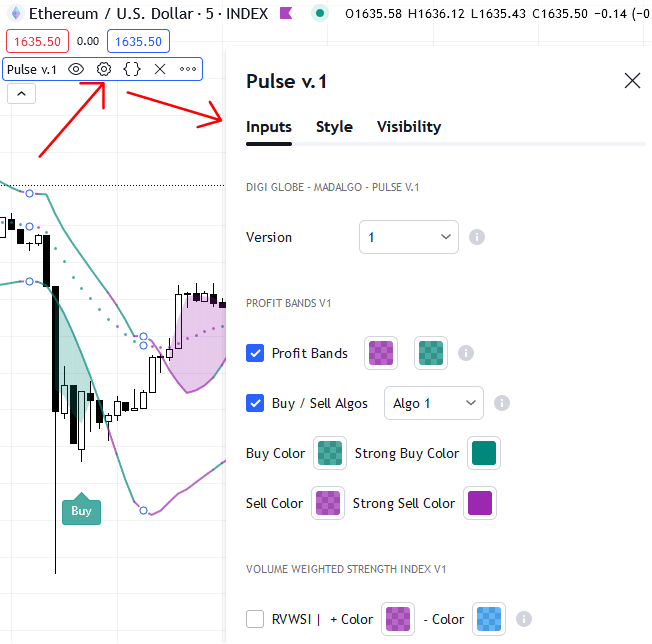
Pulse Adjusting Settings

To fine-tune settings, hover your cursor over the indicator title, prompting a list of icons. Click on the gear ⚙️ icon to open the settings panel.

Alternatively, double-click any element displayed by the indicator, be it signals, overlaid indicators, or the dashboard, to access the settings panel.

Style Settings

Every feature is customizable in terms of color, accommodating individual user preferences for a seamless UI/UX experience.

← PreviousJoin MADALGO In DiscordNext →Profit Bands W/ Signals

On this page

  • Features
  • Main Settings
  • Signals
  • Volume Profile Pro
  • Adjusting Settings
  • Style Settings