MADALGO Dynamics is the third key component of the toolkit offered by MADALGO, offering a wide spectrum of price action related tools, zone & divergence finders, and much more. It equips traders with precisive tools to make enhanced trading decisions based on the current market structure. Provided below are the pages describing each of the features in the main indicator in detail:
Features
Main Settings
The MADALGO Dynamics like the Navigator and Pulse presents an array of settings influencing its behavior and visual aspects. These settings are specific to their corresponding features and are elaborated on their respective pages. The indicator comprises multiple sections for settings. The foundational settings are detailed in the subsequent sections:
Source
The "Source" setting in MADALGO Dynamics is a critical choice that determines the specific price data used for calculations in various features of the indicator. It offers options such as "open," "high," "low," "close," and "OHLC4" (the average of open, high, low, and close prices). Selecting the appropriate source is essential, as it directly impacts the accuracy and relevance of the insights provided by the indicator. Different features may require different sources to generate meaningful signals and trend analysis.
Div Mode
The "Div Mode" setting within MADALGO Dynamics holds a pivotal role in the Divergence Finder feature. This feature acts as a powerful tool to identify and visualize active divergences across the MADALGO Dynamics Oscillators. Divergences, often regarded as key reversal signals, occur when the price action and the oscillator's movement exhibit a discrepancy. By enabling the "Div Mode," you unlock the capability to automatically detect these divergences, enhancing your ability to identify potential trend shifts and trading opportunities with greater precision. This setting streamlines the analysis process, helping you make informed decisions based on these notable market divergences.
Gradient
The "Gradient" setting serves as a fundamental visual element in MADALGO Dynamics. This feature introduces a dynamic color gradient that adapts to the changing market conditions. As market trends shift and momentum evolves, the gradient effectively reflects these variations through its color spectrum. This visual cue aids traders in intuitively comprehending the transitioning market dynamics. When activated, the gradient provides a comprehensive visual representation, offering valuable insights into the strength and direction of trends. By harmonizing with the indicator's other components, the gradient amplifies the overall readability and interpretability of the MADALGO Dynamics, contributing to more effective trading decisions.
Adjusting Settings
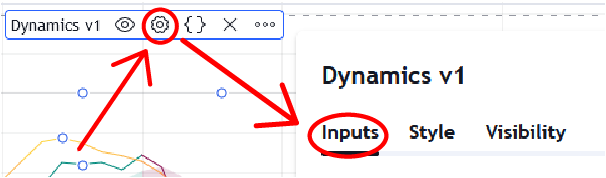
To fine-tune settings, hover your cursor over the indicator title, prompting a list of icons. Click on the gear ⚙️ icon to open the settings panel.
Alternatively, double-click any element displayed by the indicator, be it signals, overlaid indicators, or the dashboard, to access the settings panel.
Style Settings
Every feature is customizable in terms of color, accommodating individual user preferences for a seamless UI/UX experience.